-
PlanPlan
-
Daily Resources and Learning Intentions
Daily Resources and Learning Intentions
Daily Resources and Learning Intentions
These learning intentions help students in Computer Science stay focused and involved.
It is important for all students in Computer Science classes to open the learning intentions and the resources that are published and posted at the start of each class and then determine the success criteria to assess understanding.
When absent or away from school, all students are expected to self-help and complete the activities to help learn and keep ahead.
DATE
TOPIC
LEARNING INTENTIONS
POWERSCHOOL
UPDATE
Wed 19 April
Rover Build - Toward Race Day Click Here Mon 17 Apr
Rover Build - Toward Race Day Click Here Fri 31 Mar
Rover Build - Toward Race Day Click Here Wed 29 Mar
Rover Build Click Here Mon 27 Mar
Maze Rover - Ultansonic Range Finder Click Here Fri 24 Mar
Competition Day 2 - Finales and Playoffs Click Here Wed 22 Mar
Competition Day 1 - Start
Mon 20 Mar
Arduino - Team Challenge - Simon Said Game
Fri 17 Mar
Arduino - Team Challenge - Simon Said Game
Wed 8 Mar
Arduino - Team Challenge - Simon Said Game
Mon 6 Mar
Arduino - Team Challenge - Simon Said Game
Mon 27 Feb
Arduino - Team Challenge & Gearbox Contsructions
Fri 24 Feb
Arduino - Team Challenge & Gearbox Contsructions
Fri 10 Feb
Arduino - Team Challenge
Mon 6 Feb
Arduino - Team Challenge
Fri 3 Feb
Arduino - First Dev Team Challenge
Wed 1 Feb
Arduino - First Dev Team Challenge
Mon 30 Jan
Arduino - Extensions with LED Flow - Circ01, Circ02
Fri 27 Jan
Arduino - Circ02
Wed 25 Jan
Arduino - Circ01
Mon 23 Jan
Arduino - First Circuits
Fri 20 Jan
Arduino - First Circuits
Wed 18 Jan
Arduino - Getting Started
Mon 16 Jan
AI and ChatGPT - Engineering Responses, Engineering Responses, Class Debate
Fri 13 Jan
AI and ChatGPT - The future of AI
Wed 11 Jan
AI and ChatGPT OR Arduino
Wed 7 Dec
Extensions and Exploring Further Techniques - FOR Loops
Mon 5 Dec
Showcase of Team Challenge
Fri 2 Dec
Final Prep Day - Games Design 2
Wed 30th Nov
Dev Groups - Games Design 2 -Course Reflection
Mon 28 Nov
Dev Groups - Games Design 2 -Self Reflection
Fri 25 Nov
Dev Groups and Scores - Applying Functions
Mon 21 Nov
Dev Groups and Scores - Applying Functions
Wed 16 Nov
Dev Groups and Scores - Functions
Mon 14 Nov
Dev Groups and Scores - Challenges
Mon 7 nov
p5.js - Images, Audio, KeyPressed()
Wed 19 Oct
More Games Programming - p5.js. - Iterative Patterns
Mon 17 Oct
Games Programming - p5.js. - Iterative Patterns
Fri 14th Oct
Iterative Patterns using RGB and Shapes
Games Programming - Functions - Geometry - Boolean Flags - Conditionals
Mon 4 Oct
Games Programming
Fri 23 Sep
Branching & Decision Making
Wed 21 Sep
Truth Table, Boolean Expressions. Branching & Decision Making
Tue 20 Sep
Boolean, Logic & Truth Tables
Fri 16 Sep
Artificial Intelligence Discussion
Wed 14 Sep
Artificial Intelligence Investigation & Discussion
Mon 12 Sep
Problem Solving
Fri 9 Sep
Summative Assignment - Solving Problems II
Wed 7 Sep
User Prompts with Scanner()
Mon 6 Sep
Using & Applying Data Types
Fri 2 Sep
Intro to Data Types
Tue 31 Aug
Input & Output IO, Publishing Assessments, First Data Types
Wed 24 Aug
Computational Thinking
-
Course Overview & Assessment
Course Overview & Assessment
Course Overview & Assessment
Course Description
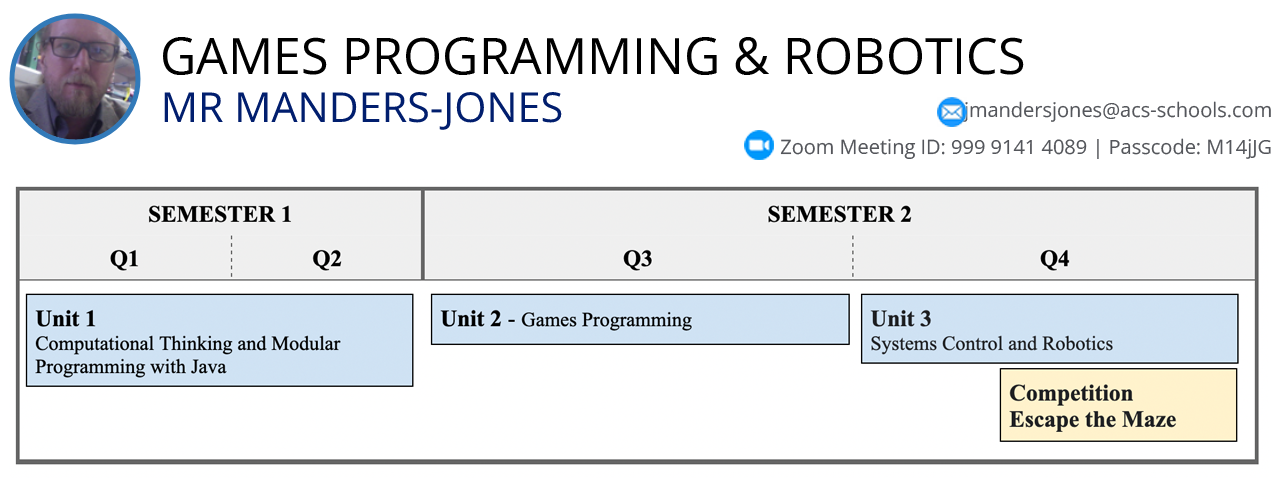
Students learn to be responsible users of digital technology, capable of developing coded solutions for specific needs. Students use ICT to develop design ideas, solve problems, develop arcade games, build robots and collaborate online. In this 1 year course, students learn general-purpose programming languages and use those skills to solve information problems and automate repetitive tasks. Our students explore a variety of coding approaches through a combination of coding interfaces with Java and BlueJ, games design with graphics and sound using Processing.org libraries, and robotic systems and control using extensive Arduino development kits and 3D printers in our HS Innovation Hub.
Unit Plan 2022-2023
Learning Enrichment and Challenge
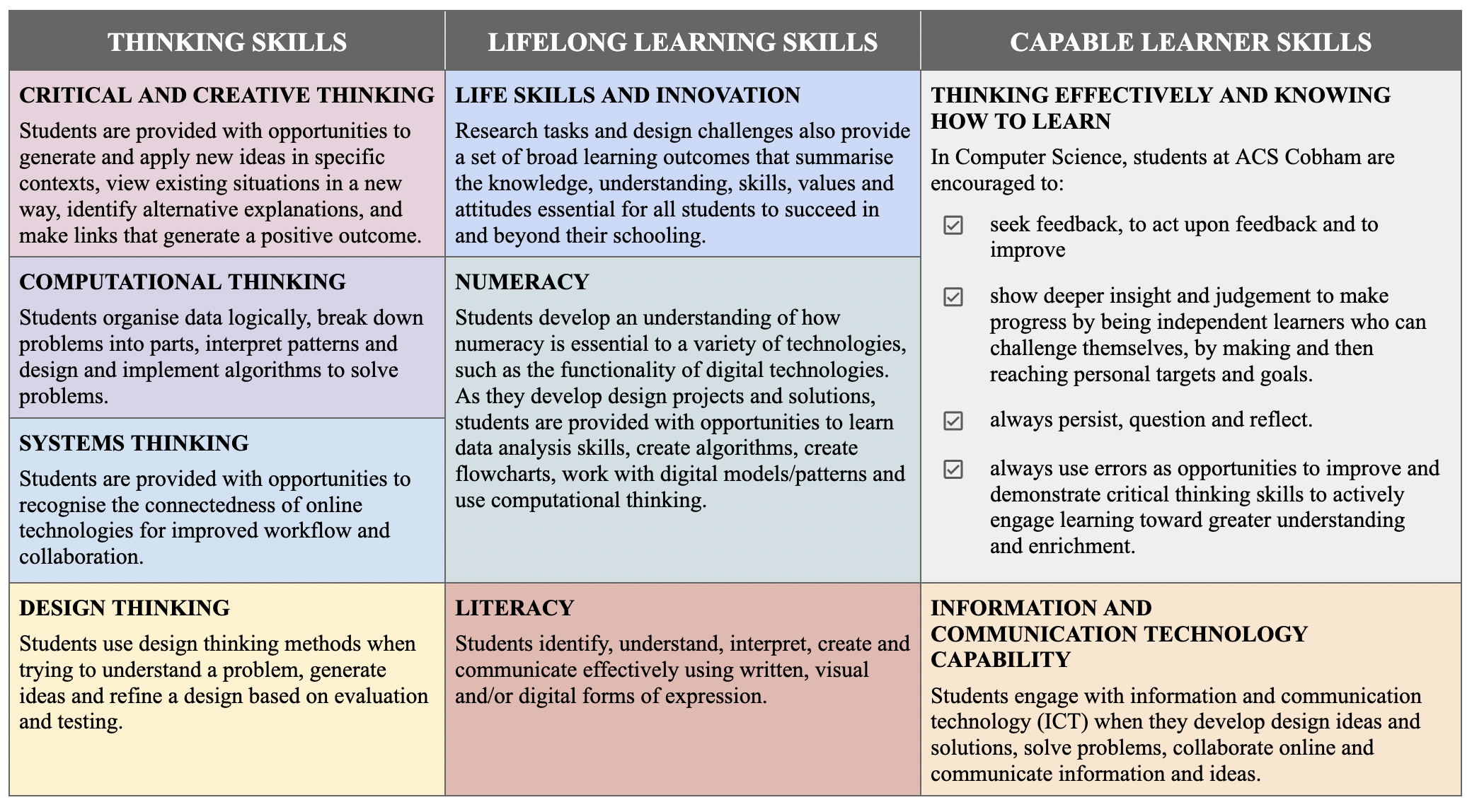
Using and Applying Technology
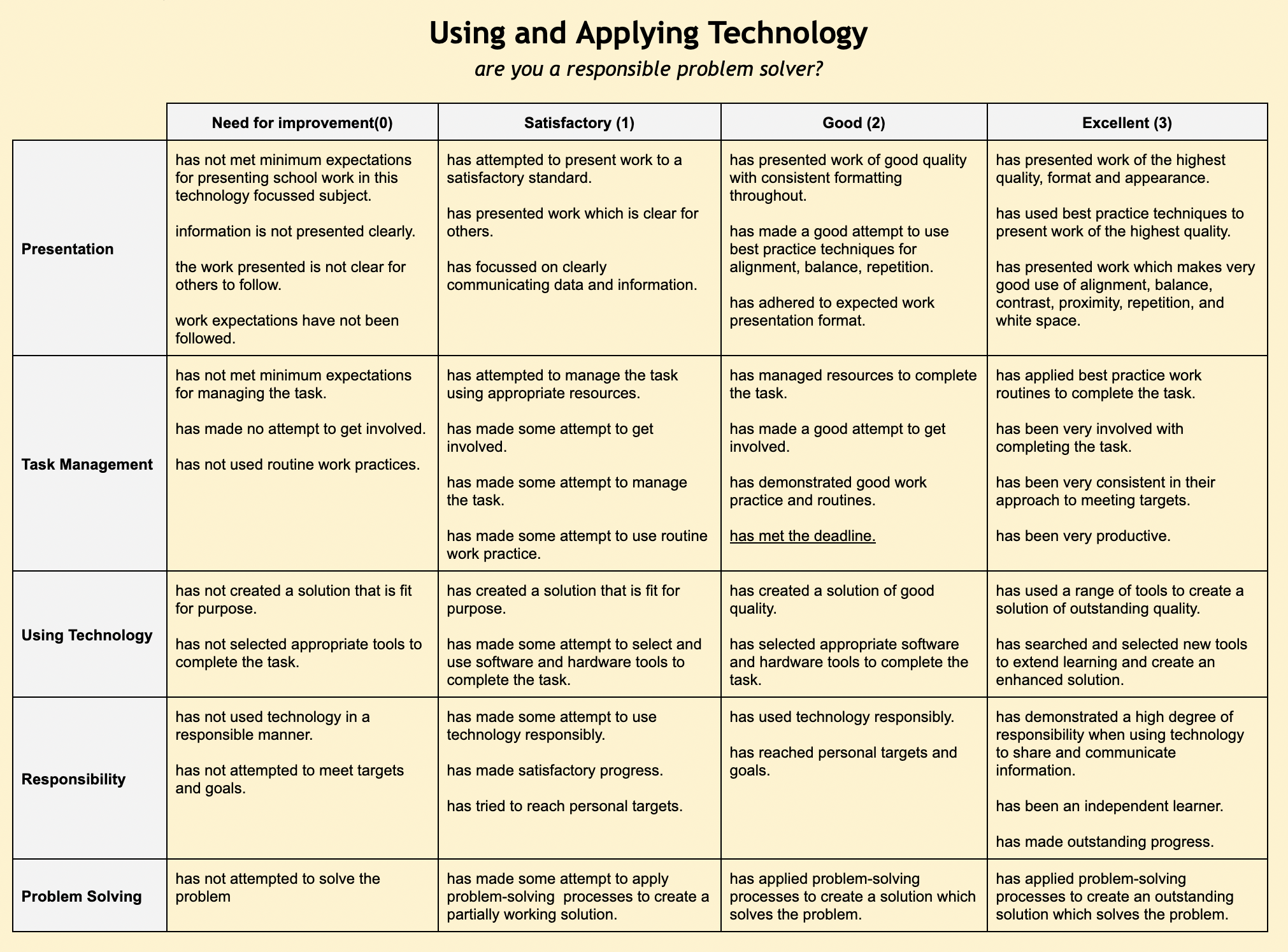
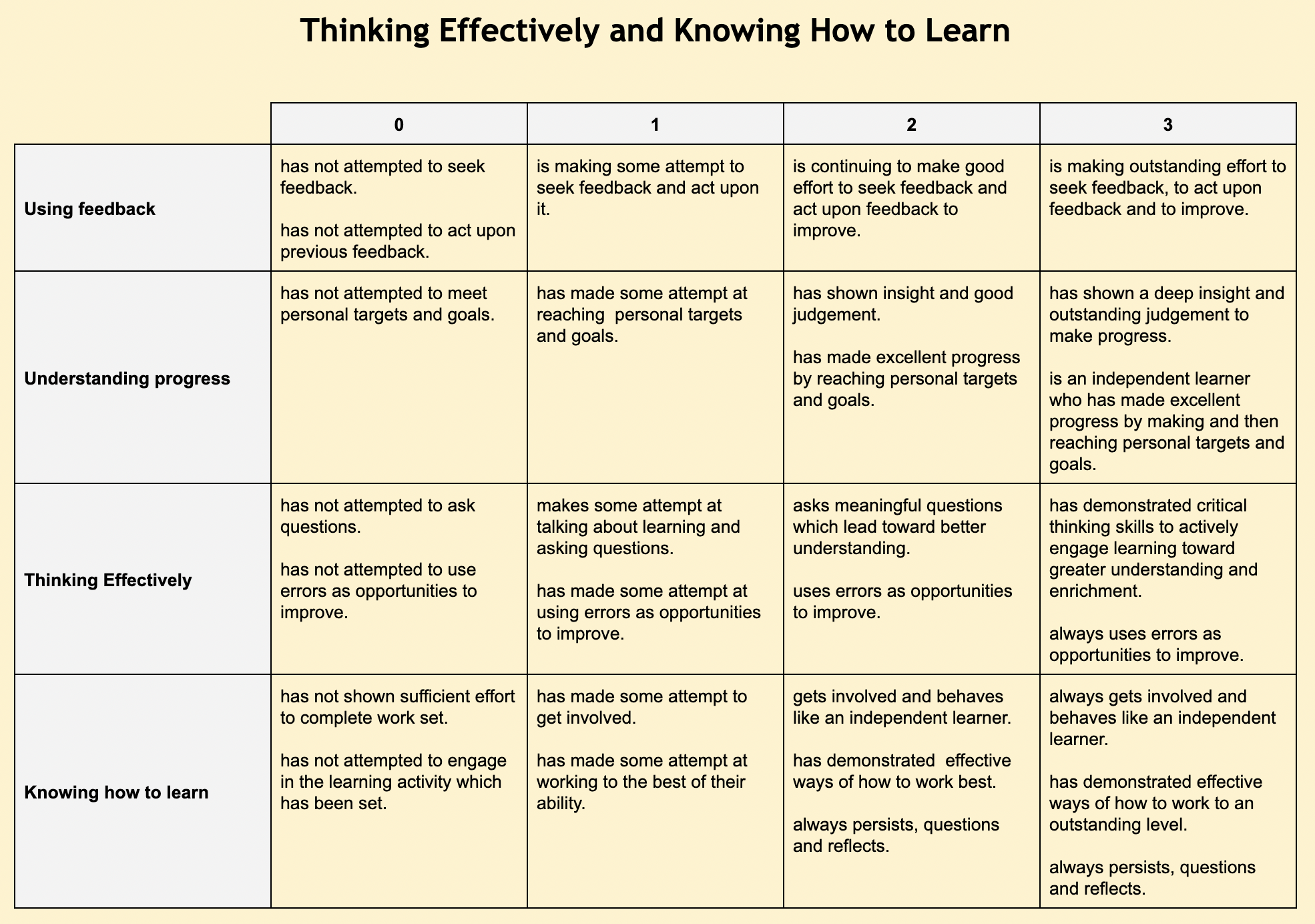
Thinking Effectively and Knowing How to Learn
Knowledge, Understanding and Techniques

Work Expectations in Computer Science
ACS computing - Knowing How to Learn
- Unit 1 - Algorithms and Programming - Getting Started Unit 1 - Algorithms and Programming - Getting Started
-
Unit 1 - Further Programming
Unit 1 - Further Programming
Unit 1 - Further Programming
Design, develop and document software solutions; test and evaluate software solutions.
Assessment Notification:
Unit 1.1
Formative (10%): A range of coding exercises and logbooks
Summative (90%):  A range of coding challenges
Students learn to...
Design, develop and document software solutions; master branching and decision making; master a range of techniques to iterate in Java using while, for and repeat loops; testing and evaluating software solutions.
- Video Tutorial -
- Video Tutorial -
- Google Worksheet - Binary to Decimal Conversions
- Practice - Cisco Binary Numbers Game
- Revision - Video Tutorial -
- Online Converter - All Bases - Check your Answers - Extension -> Create it in Java
Extension Students: Create your own version of the base convertor. You may also extend with SWING or JavaScript.
- Practice - Flippy Bit Game
- Video Tutorial - RGB Colours Explained
- Summative Assignment - Binary, Hex Conversion Worksheet
- Quick reference - The ASCII conversion table
- Video Tutorial -
Branching and Decision Making
GAMES PROGRAMMING
KEY RESOURCE: Tutorials for the p5.js language
http://learningprocessing.com/examples/chp01/example-01-01-stroke-fill
REFERENCE AND COMMANDS HELP: Full syntax help and examples for p5.js
https://processing.org/reference
INSTRUCTIONS
In preparation for our Games Programming Unit, we offer the following tutorials for your ongoing and independent study. Over the next three weeks, you will complete each of the five tutorial chapters at your own pace.
All students should have made good progress through each of these assessments and tutorials by the 10th of October. Mr MJ will review your progress upon his return, so plan your time wisely. Do not procrastinate and experiment with each tutorial. Have fun, extend, and enjoy. We don't expect to complete them all in one week, so they will be uploaded over the course of the next three weeks.
Extension: You can download the full app from here http://processing.org/download and complete the tutorials there. Have fun creating your own simulations or mini-games if you complete all tutorials.
ASSESSMENTS (upload to the course grade book, slots now posted)
NAME
DESCRIPTION
Formative 1 - Ch2 - P5.JS - Geometry - Zoog
Draw your own Zoog. Be creative using the examples in Chap 1-2 as a guide.
Formative 2 - Ch3 - p5.js Event Handling - Translated Zoog
Translate your Zoog from Formative 1 using the mouse and Chap 3 as a guide.
Formative 3 - Ch4 - p5.js Variables - The Rise of the Zoog
Create a rising Zoog using 4-08 Zoog Variables as a guide.
Formative 4 - Ch5 - p5.js Conditionals - Bouncing Zoog
Extend your Zoog and bounce it across the screen using 5-10 as a guide.
Upload your completed assessments to JupiterED. Read the instructions and assessment rubric which are posted for each.
Screenshot from our online course grade book showing upload slots and dates
TUTORIALS
Work through each of the examples in Chapter 1 to Chapter 5 as listed below in the table.
Experiment with each tutorial. Have fun, extend, and enjoy.
You shouldn't avoid or neglect the full online p5.js syntax reference guide since it contains examples and additional help.
CHAPTER 1
CHAPTER 2
CHAPTER 3
1-1 Stroke Fill
1-2 No Fill
1-3 Rgb Color
1-4 Alpha
1-5 Zoog
2-1 Zoog
3-1 Setup And Draw
3-2 MouseX MouseY
3-3 Zoog Mouse
3-4 Continuous Line
3-5 Mouse Key Events
3-6 Interactive Zoog
3-7 Translated Zoog
CHAPTER 4
CHAPTER 5
4-2 Using Variables
4-3 Incrementingvar
4-4 Many Variables
4-5 System Variables
4-6 More Variables
4-7 Random Painting
4-8 Zoog Variables
5-1 Conditionals Fading Colors
5-3 Rollovers
5-4 Hold Button
5-5 Switch Button
5-6 Bouncing Ball
5-7 Bouncing Color
5-8 Path Along Edges
5-9 Gravity
5-10 Bouncing Zoog
Iterations
- Unit 2 - Games Programming & Computer Graphics Unit 2 - Games Programming & Computer Graphics
- Unit 3 - Robotics & Control Systems Unit 3 - Robotics & Control Systems


